Send us a Message


Submit Data |  Help |  Video Tutorials |  News |  Publications |  Download |  REST API |  Citing RGD |  Contact   
Pathways

QTL Help

Definition of a QTL

Quantitative Trait Locus (QTL) is a physical chromosomal location that contains alleles that differentially affect the expression of a continuously distributed phenotypic trait. Usually it is an area (locus) delineated by strain-specific markers. If genetic variation in the locus is statistically associated with measured variation in the trait, a QTL results.

A disease-specific QTL in a rat model is obtained by genetic crossing and analysis and is expected to contain one to many genetic elements that would be contributing to the phenotype in the rat. An affected strain (showing the phenotype) is crossed with an unaffected strain (lacking the phenotype), the progeny are genotyped and phenotyped, and through statistical techniques, a correlation is made between a particular genotype and the phenotype being measured. RGD curates rat and human QTL and imports mouse QTL from Mouse Genome Informatics or MGI.

For a comprehensive review of QTL mapping techniques in the rat see “Genetic Analysis of Inherited Hypertension in the Rat” by John Rapp, Physiological Reviews, 90:135-172,2000.

Searching for QTLs

RGD provides several methods for locating information on QTL. Users can either perform quick or specific queries to obtain information.

1. RGD Search:

This will search QTL symbols, names, aliases, trait names, trait description/method, and annotations. (See General RGD Search help for more information).


Quick Guide

  1. The QTL search page can be directly accessed from the RGD home page from “Data’.
    Go to http://rgd.mcw.edu

  2. OR

  3. Enter your search term (symbol or keyword) in search box in the upper right

  4. Click   

QTL Search

1. The QTL search page can be directly accessed from the RGD home page from “Data’.


2. Enter the QTL symbol/keyword and click ‘Search QTLs’ to search the QTL in the database. Rat, Human and Mouse are the available species options. In addition, ‘Chr’ position is available as an option for the search.


3. The search results page shows the available QTL associated with your search term. Click on Genome Viewer (GViewer) to view their genomic positions or download the results using Excel Download.

QTL Report Page

General

4. The “General” tab contains most of the information in RGD about the QTL.

Symbol: The approved QTL symbol. This may be different than the symbol used in the article, but all other symbols used for this QTL will be listed in the alias symbol section (not shown in this example).

Name: The approved full-text name and number of the QTL.

Trait: The measurable phenotypic trait, using terms from the Vertebrate Trait ontology, that has been mapped to the QTL. If multiple traits were reported in the article, only the trait with the highest statistical significance will be indicated.

Measurement type: How the trait was measured, using terms from the Clinical Measurement Ontology..

LOD Score: ‘Logarithm of the odds’ score, indicating linkage significance of two loci, or linkage between a locus and a phenotype or disease.

P value: The probability of obtaining a test statistic at least as extreme as the one that was observed, assuming that the null hypothesis is true.

Variance: A measure of the variability of a set of numbers.

Position: The chromosome and map coordinate position for the QTL in different genome assemblies are provided (five assemblies are shown here), with the source.

Cross Type: The type of cross used to determine the QTL.

Strains Crossed: The strains that were used to determine the QTL. The strain symbols are linked to Strain reports with more details about each strain.

JBrowse: View the position of the QTL in the genome.

Model: A view of the QTL presented in the JBrowse tool. Click on ‘Full screen view’ to expand the view.


This branch icon brings users to the ontology browser page which displays parent, sibling, or child terms, synonyms, and the graphical structure of the term relationships.Clicking on annotation terms in the browser will bring up the ontology report page to view all objects associated with the term.


The Annotation icon will bring users to the ontology annotations report page to view all objects associated with the term.

Annotations

5. The Annotation section includes subsections containing ontology annotations assigned to the QTL.  These are organized by ontology type and are linked to their respective annotation term and reference report pages. Also, see the evidence code guide to learn more about evidence codes.

Disease Annotations:  These annotations represent disease to QTL associations manually curated from the biomedical literature or imported through automated pipelines from OMIM (Online Mendelian Inheritance in Man) or GAD (Genetic Association Database). The terms come from the RGD Disease Ontology (RDO), which combines RGD-created disease terms with the Disease Ontology.

Phenotype Annotations: These annotations represent the association of QTL with particular phenotypes.  The terms come from the Mammalian Phenotype Ontology (MP) developed at MGI and the Human Phenotype Ontology (HPO), currently being developed at the Jackson Laboratory for Genomic Medicine. The terms are supported by the same group of evidence codes as used for Disease vocabulary annotations.

Experimental Data Annotations: Listed are annotations using terms from five different ontologies, with the appropriate evidence codes. These terms were used to curate the QTL from the paper(s) originally describing it. If a disease term was used, it will be found in the “Disease Annotations” subsection. Each term links to a Term Annotation Report providing information and links about the reference used, the QTL and the ontology term, including a link to the term ontology report.

6. ‘Click to see Annotation Summary View’ shows annotations in summary mode.
The measurable phenotypic trait that has been mapped to the QTL. If multiple traits were reported in the article, only the trait with the highest statistical significance will be indicated.

References, Region and Additional Information
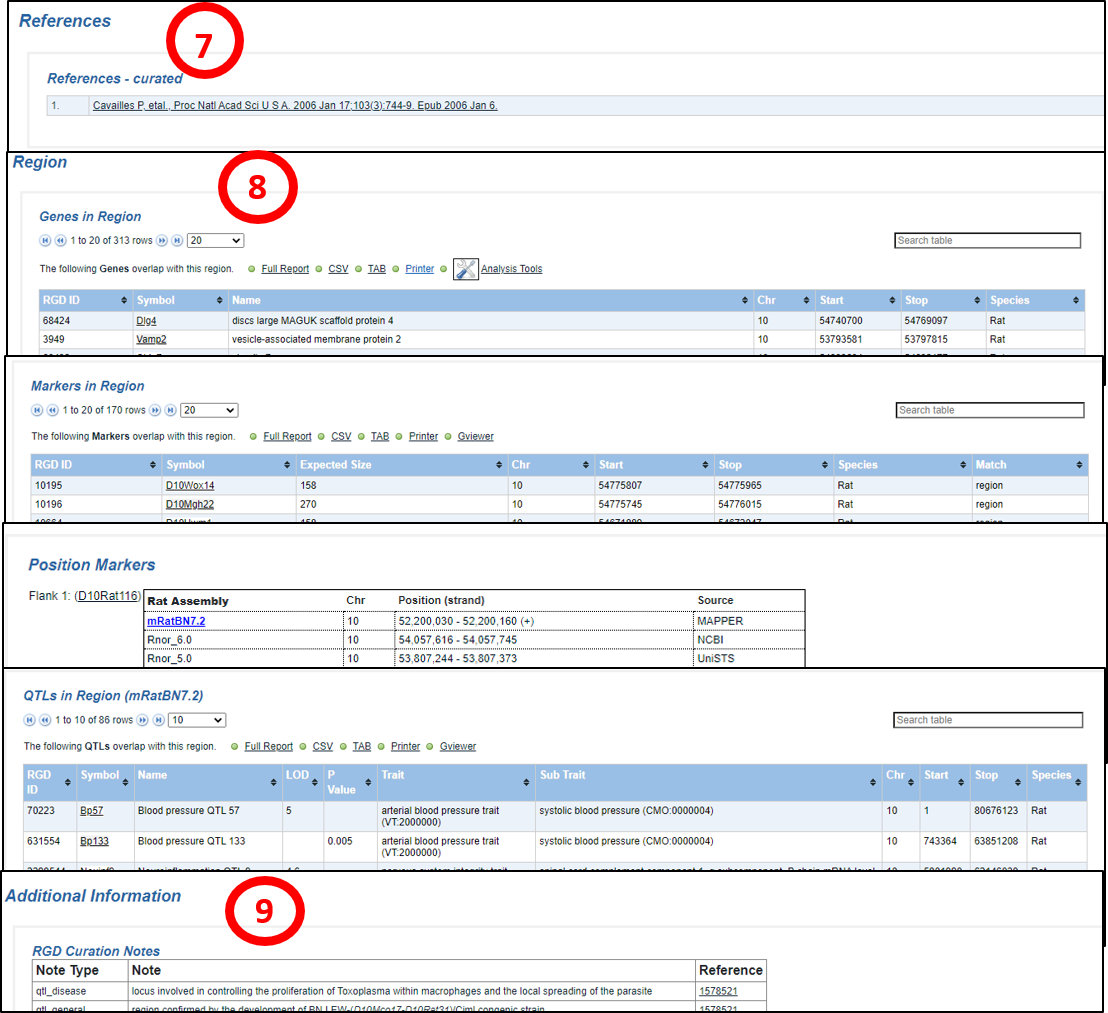
7. References – curated: All references connected to annotations on the QTL report page are listed here. Citations link to RGD Reference report pages which in turn link to PubMed in most cases.  For more information about RGD Reference Reports, click here.


8. Region

Genes in Region: Lists genes in the genome assembly that overlap the region of the QTL, with descriptive information. The data is downloadable and exportable to analysis tools.


Markers in Region: Lists markers in the genome assembly that overlap the region of the QTL, with descriptive information. The data is downloadable and exportable and can be viewed in Gviewer (Gviewer help).


GViewer Position Markers: Flanking and/or peak markers are listed, with positional and source information, and links to marker report pages.


QTLs in Region: Lists other QTLs in the genome assembly that overlap the region of the QTL, with descriptive information. The data is downloadable and exportable.


9. Additional Information

RGD Curation Notes: Descriptive curator notes in several categories are listed with reference links.


NHLBI Logo

NHLBI Logo

RGD is funded by grant HL64541 from the National Heart, Lung, and Blood Institute on behalf of the NIH.