

Send us a Message


Submit Data |  Help |  Video Tutorials |  News |  Publications |  Download |  REST API |  Citing RGD |  Contact   
Pathways

References

Much of the data that appears on the website comes from the scientific literature. The articles curated for information can be retrieved from the database using the reference search page or links on an object page. For each reference, information includes the title, abstract, and citation. References describing data obtained in bulk from various researchers and other sources are also included.

RGD has two types of references – curated and uncurated. The curation staff has manually reviewed curated references and information relevant to the database has been extracted into the database. Uncurated references are known to contain relevant data but have not yet been manually reviewed. These are found as PubMed links listed in the ‘References – uncurated’ section of an object report (e.g. a gene report).
Reference Search

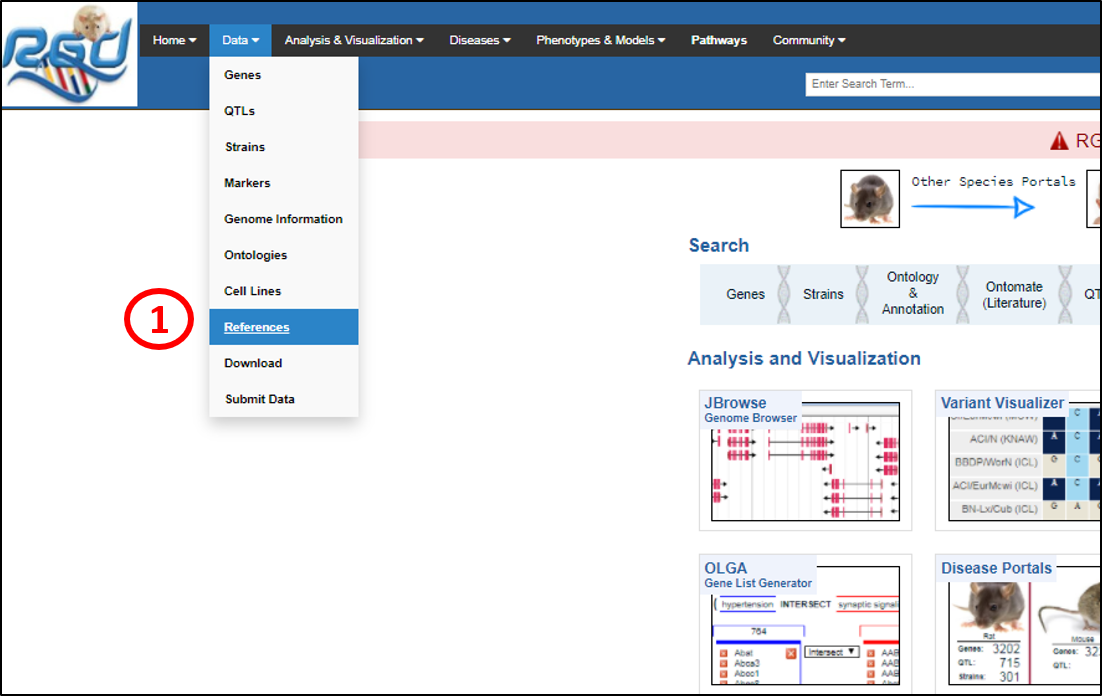
1. The Reference Search page is accessed by mousing over ‘Data’ in the top black banner and clicking ‘References’ in the pull-down menu, or clicking ‘Data’ to go to the ‘RGD Data’ page and clicking ‘REFERENCES’ (not shown).


2. References can be searched by any word or word fragment in the title or abstract, by the author’s last name, and/or by year of publication coupled with another term. Searches are case insensitive. Example searches are provided above the text entry box. Asterisks serve as wild cards.


Reference Search Results

3. The search result contains a list of references containing the search term(s) (highlighted in yellow).
 
 
4. For each reference, displayed are the Title, Citation, Authors, RGD ID and Matched By (all linked to the reference report page – see below).
 
 
5. The reference list can be exported using the ‘Excel Download’. Select the required references by clicking the check boxes on the left.


Reference Report Page

Clicking on Title, Citation, Authors, RGID, or Matched By opens the reference report page in a new tab that is divided into Disease, Phenotype, Objects Annotated and Objects referenced in this manuscript. Click on the section title on the left to go to the required section (the displayed section is highlighted in blue) or alternatively scroll down on the page.

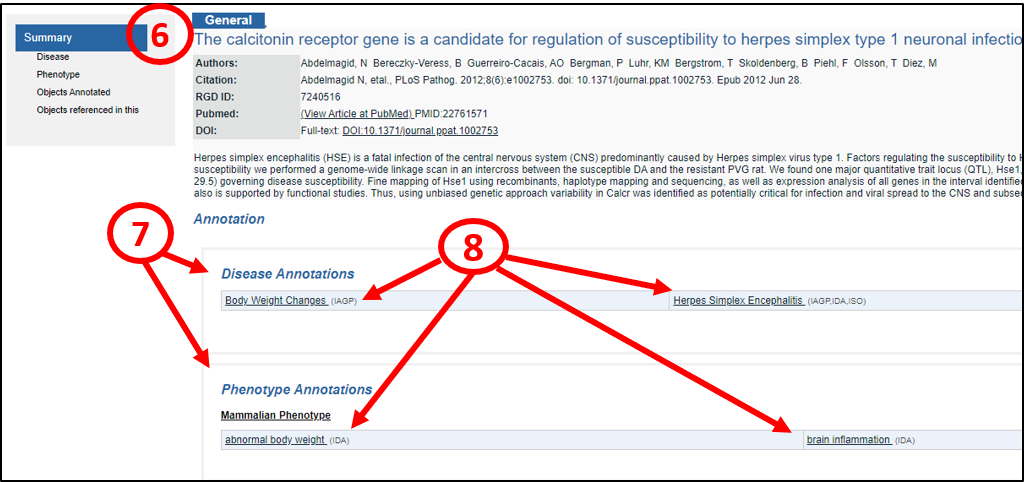
6. The ‘General’ tab contains most of the basic information about the reference, including authors, citation, RGD ID, Pubmed ID, and links to PubMed (‘View article at PubMed’) and DOI (‘Full-text’ link).


7. The ‘Annotation’ section contains information about ‘Disease Annotations’, ‘Phenotype Annotations’ or ‘Objects Annotated’ (such as genes, strains, QTLs) if the reference is curated.


8. The Disease/Phenotype annotations annotated to the reference are shown with their evidence codes. Click on them to view their linked annotation report pages (see below).

.


Disease/Phenotype Annotation Report Page

Clicking on the disease or phenotype term shows their linked respective annotations report pages.

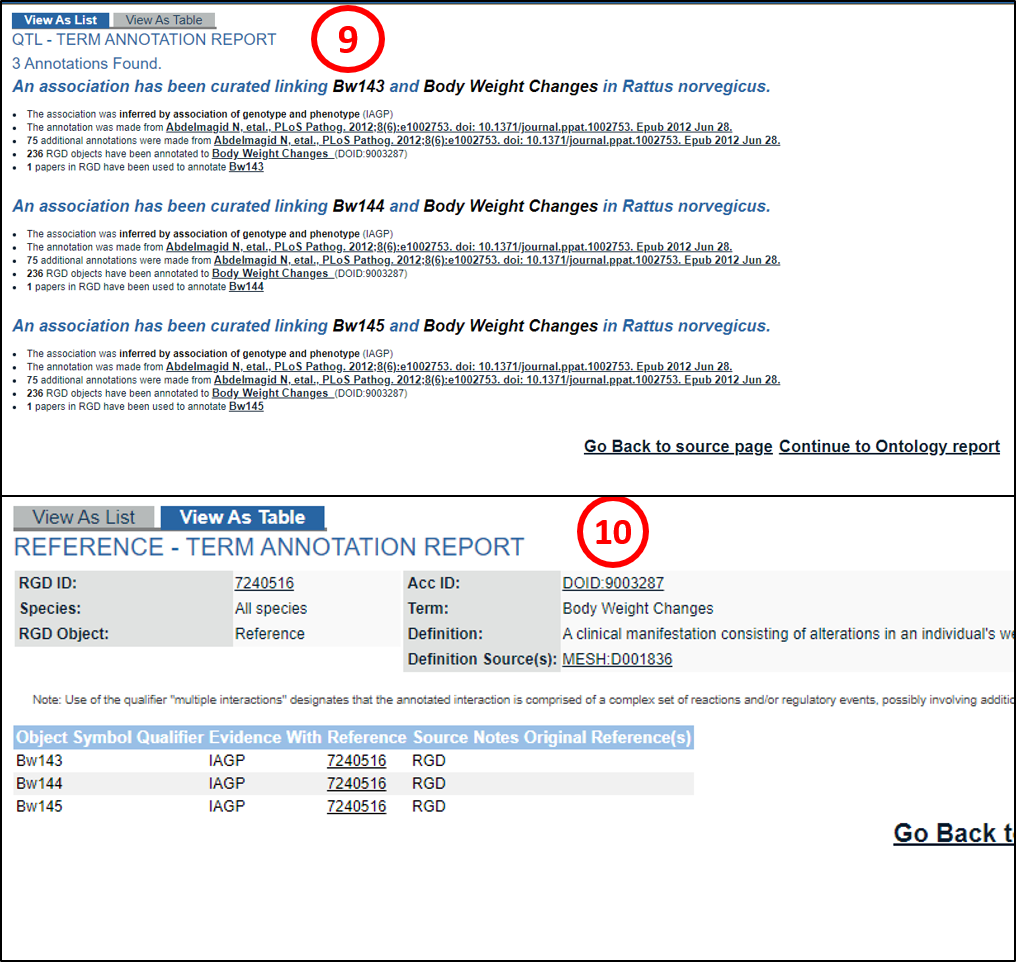
9. The “View as List” tab shows the annotations as a list and is the default selection. It shows information about evidence code and citation. It also shows the number of annotations, objects annotated to the term and, papers annotated to the object (QTL in this case). Curation notes, if present (not shown in this) give additional information about the annotation.


10. Click on the ‘View As Table’ tab to view the information in a tabular format. Information about the Term, Definition and the Definition Source(s) is also shown.


Reference Report Page-Objects Section


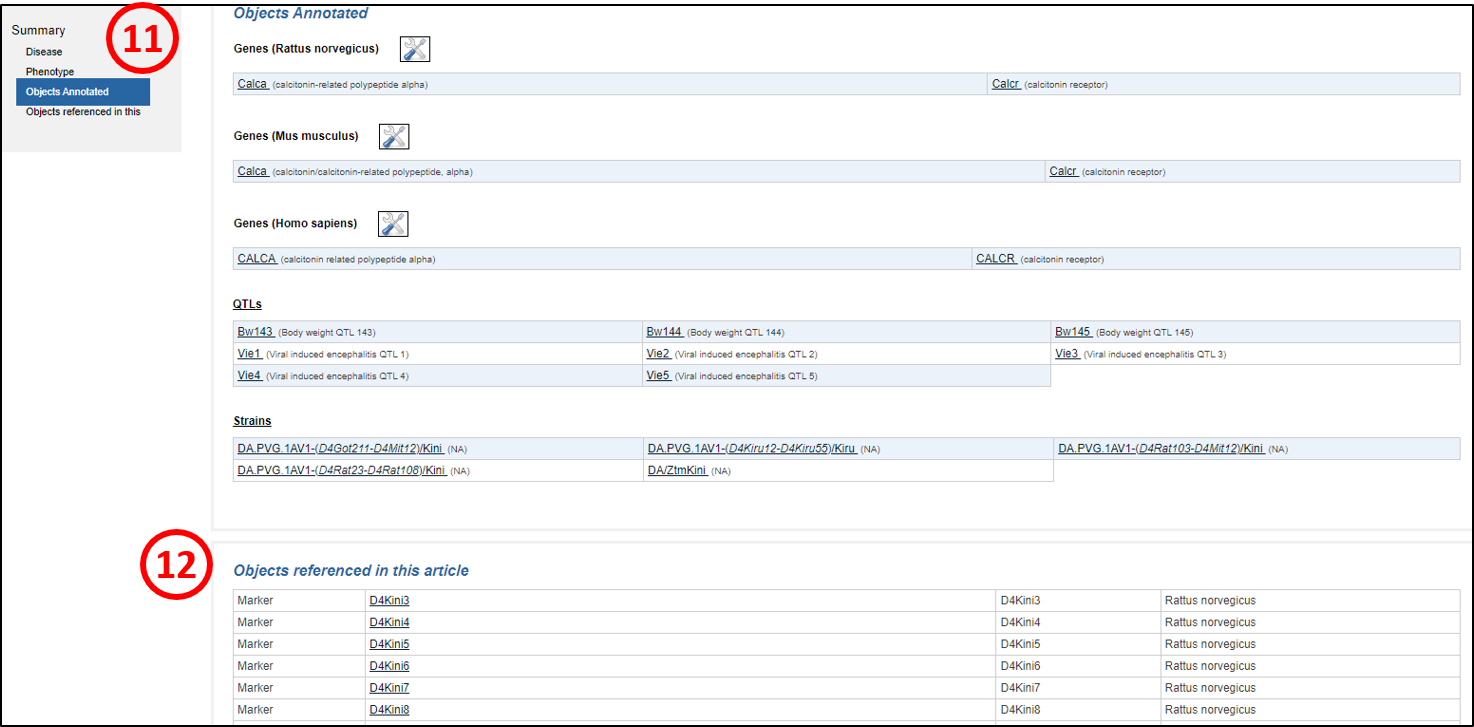
11. Scrolling down the page or clicking on ‘Objects Annotated’ shows the objects annotated to the reference. The objects in ‘Objects annotated’ (Genes, QTLs, Strains) are linked to their respective report pages (e.g.Gene report page, strain report page and QTL report page.


12. Similarly, view the all objects (such as markers) referenced in the article using ‘Objects referenced in this article’. They are also linked to their respective report pages.

[return to top]


NHLBI Logo

NHLBI Logo

RGD is funded by grant HL64541 from the National Heart, Lung, and Blood Institute on behalf of the NIH.